Docs
Invoicing
From “job’s done” to “sent” in a minute — and a ledger that always says what’s still out.
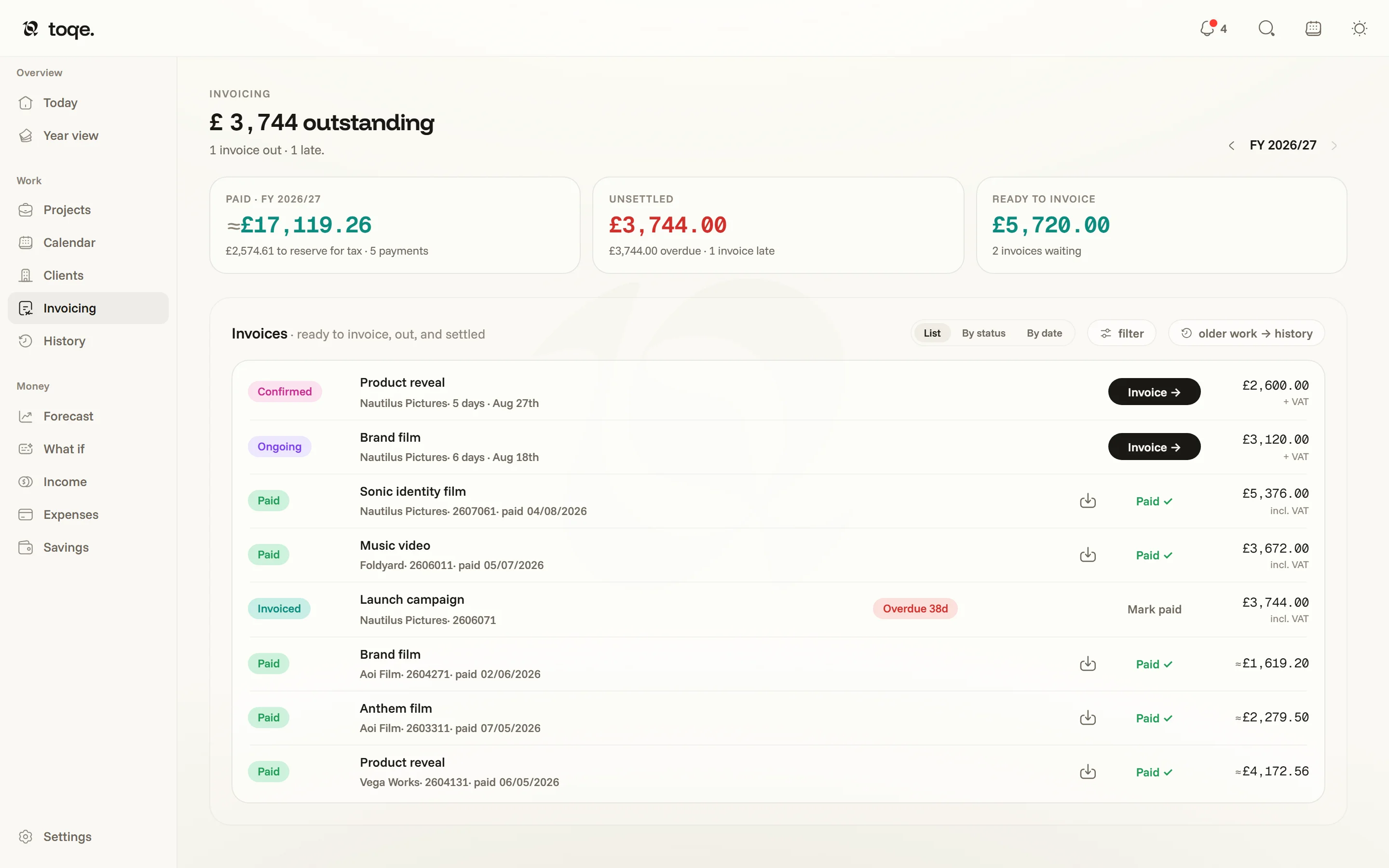
The ledger
The headline is what’s outstanding — the word for money out, page-wide. Three tiles sit under it — Paid this fiscal year, Unsettled (out, with the overdue slice named), Ready to invoice (finished work nobody’s been asked to pay for) — and the ledger shows every project exactly once, in two groups: Open holds everything still in motion, unbilled work and invoices out alike, and Settled is the year’s record — a project crosses that line once, the day its last invoice lands. Each project is a card with its invoices listed beneath it; filter narrows the rows and history opens History.
One year at a time
The year stepper in the corner scopes the whole page, and a card counts only the money of the year you’re on. Invoices from other years stay on the card, tagged with their year (↪), so a job’s paperwork is never split up. A project invoiced in one year and paid in the next stays in the earlier year’s list, marked with the year it was paid; a card that reaches past the year says so — “started FY 2025/26”, “landed in FY 2026/27”. A past year with nothing on it says where its payments went.
Raising an invoice
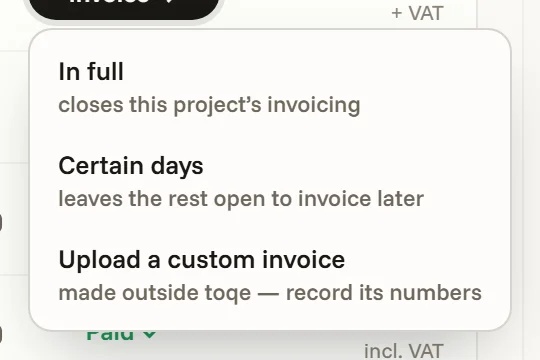
Every row with work left to bill carries one dark control — Invoice → — and its menu holds the three ways to bill: everything remaining, certain days (paint which — only days the booking actually worked are paintable, and days already on an invoice can’t be claimed twice), or on flat-fee work a share of the fee. Line items assemble from the painted days at the project’s rate, extras included; a final invoice picks up whatever partials left behind.
The third option, Record an invoice made elsewhere, is for an invoice you raised in another tool: no sheet, just its numbers — everything remaining or a part of it, a reference if you want one, the PDF attached if you have it. It lands in the ledger already sent, so the pills, the payment clock and the step to Complete read it exactly like one toqe made.
Sent, then paid
Every row leads with the project’s own status, and the state column beside it says where the money is. On any row that names one invoice, that pill is the control — Draft → Invoiced → Paid — and picking a word makes the move, each option captioned with what it does. A parent row carrying several invoices reads its derived state there instead, and each invoice under it takes its own pill. Everything else an invoice can need — edit, download PDF, open the saved PDF, unsend, mark not paid, delete — lives in the ⋯ at the row’s end, every item saying what it does and what it costs. These are the ledger’s own seats:
Sending it (picking Invoiced) is the act that matters: it starts the payment clock from the client’s terms, fixes the invoice number for good, and moves the project nowhere at all — a deposit on a job still running keeps it Ongoing, with the Invoicing column reading Part invoiced. Paid settles it, and the paid date is editable afterwards, because catching up on a week of bank statements shouldn’t stamp everything “today”. The one thing the paperwork does move is the last rung: when every invoice covering a Finished project has landed, it becomes Complete — from whichever door you mark, this tab, the bell or the row — and steps back to Finished if one is later un-paid.
If you invoice from another tool
toqe doesn’t have to make the invoices to keep track of them. At the bottom of Settings → Invoicing, Stop making invoices in toqe… says what it will hide — the sender details, bank accounts, signature and numbering blocks — and that nothing is deleted, then puts the sheet away. The ledger’s primary becomes Record →, with two options: invoiced in full, or in part. Everything else is unchanged — the Invoicing pills, the payment clock, the bell’s overdue nudges and the step to Complete all read the same records. Make invoices in toqe again brings the sheet back exactly as you left it.
Numbers, VAT and the sheet
References default to date-based (YYMMDD plus a counter). If your country requires an unbroken sequence, Settings → Invoicing switches to sequential numbering — the next number is derived from the ledger itself so it can never drift, “Start from” lets you arrive from another system mid-sequence, and a number that has been sent is spent forever, even if the invoice is later deleted.
Where VAT applies, the page names its bases: the work is worth its pre-tax gross (your income), the paper asks for the total with VAT (the cash that moves) — quiet “incl. VAT” / “+ VAT” keys sit under the figures, and hovering any amount spells out the arithmetic. The PDF itself carries your logo, signature and per-currency bank details — or no logo at all, if you’d rather your name and address took the corner (Settings → Invoicing → Remove logo; your artwork waits there for the way back). Underneath the page a person reads, every export is a compliant e-invoice: EN 16931 / Factur-X, XRechnung for Germany, signed Facturae for Spain.
If a project ends up billed for more than it’s worth — a duplicate, or work that shrank after billing — the row says so plainly. Dismissing the note remembers the gap, so it stays quiet unless the numbers move again.