Docs
Taxes
Set aside as you earn, see the deadlines coming, and log what actually went out.
The next bill, and the year
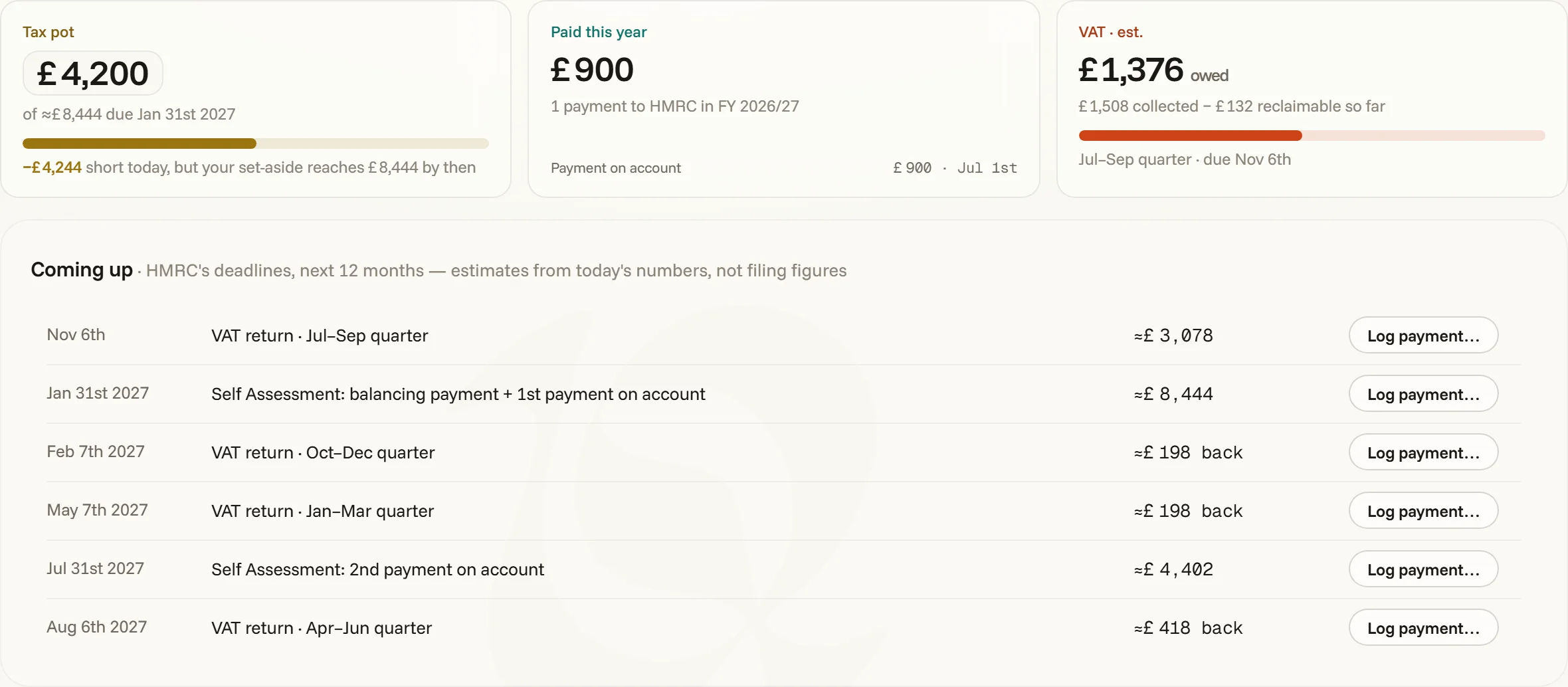
Taxes has its own seat in the sidebar. The headline is the next bill — what’s due and when — with what you’ve paid this fiscal year and how many deadlines fall in the next twelve months. The strip under it shows the year’s tax leaving, month by month, with the pot as a line across it. Three cards sit beneath:
- Tax pot — what you’ve set aside, measured against the next income-tax bill. The bar says whether today’s pot covers it, and whether your set-aside reaches it by the deadline. The pot looks like a field on purpose: type it as your statement shows it whenever you like, and logged payments drain it on their own.
- Paid this year — the year’s payments to the tax office, with the latest one named.
- VAT — an estimate of what’s owed for the quarter in hand: collected, less what you can reclaim so far.
Coming up, and the log
Coming up derives your country’s real deadlines live — income dates from the recipe’s calendar, VAT returns from your quarters — with amounts from the same simulation the forecast runs, so it’s always current and never stored stale. The log records what you actually paid.
“Log payment…” on any deadline stages its date and kind into the log’s ghost row with focus on the amount — you correct it to what really went out, then commit; the page jumps to the row, swapping fiscal years if the payment belongs to another one. A future-dated payment is a scheduled row: it stands the calendar’s estimate down (its deadline reads “scheduled ✓”), the forecast pays your number on your date, and it edits or deletes like any row. Logging a past income payment drains the pot on its own — no bookkeeping to do.
This year’s estimate shows the working — turnover, business costs, profit, each tax and contribution, and the share of every payment that’s set aside. The summary on the right splits the year into paid, scheduled and still expected, and what’s ahead by kind of tax.
Past years keep their rate
Step back a year and the page is that year’s: what you paid then, its strip and its log, under the violet banner that marks another year. Once a year is behind you, toqe keeps the rate its payments were set aside at, so changing your rate today leaves last year’s figures alone. Years that ended before toqe kept rates start at today’s — if that isn’t the rate you used, click it on the past year’s rate card and type the right one; Income’s set-aside column and Invoicing’s “to reserve” follow.
When tax leaves the balance
By default toqe runs set-aside: tax is netted off each payment as it lands, and deadlines only drain the pot — the balance never jumps. Where your country names real payment dates, Settings → Taxes offers at the deadlines instead: income lands gross and the accrued liability leaves the balance on the dates — the bank-account view, cliffs and all. The forecast, the chart and the schedule follow whichever clock you pick.
The recipes
Pick where you pay tax and the whole instrument follows — bands and social charges, the fiscal year, deadline dates, the local word for VAT — for the UK, Ireland, France, Germany, Spain, Portugal, Greece, the US, Canada and Australia. Where a recipe involves a real premium (Germany’s private health insurance, say), toqe stores it as an actual expense row it creates or adopts — so the forecast, the ledger and the deduction all read the same number.
Estimates are estimates — the schedule says so on its face. toqe reserves and reminds; your accountant files.