Docs
Settings
The knobs, honestly labelled — money, taxes, invoicing, appearance, data.
The sections
- Money — how a new booking is priced (day rate, flat fee or hourly), your usual day rate and payment terms, the overbooking warning, and the currencies you work in. Your balance, safety buffer and baseline income are set on the Forecast page — the balance and buffer in its heading, the baseline on its chip.
- Taxes — where you pay tax and how (the recipe and your structure), when tax leaves the balance, VAT registration, the fiscal year, and the e-invoice format (Taxes explains the timing choice).
- Invoicing — your sender block, logo (or no logo) and signature, bank details per currency, and the numbering scheme (Invoicing covers sequences) — and, last on the page, the switch for people who make their invoices in another tool.
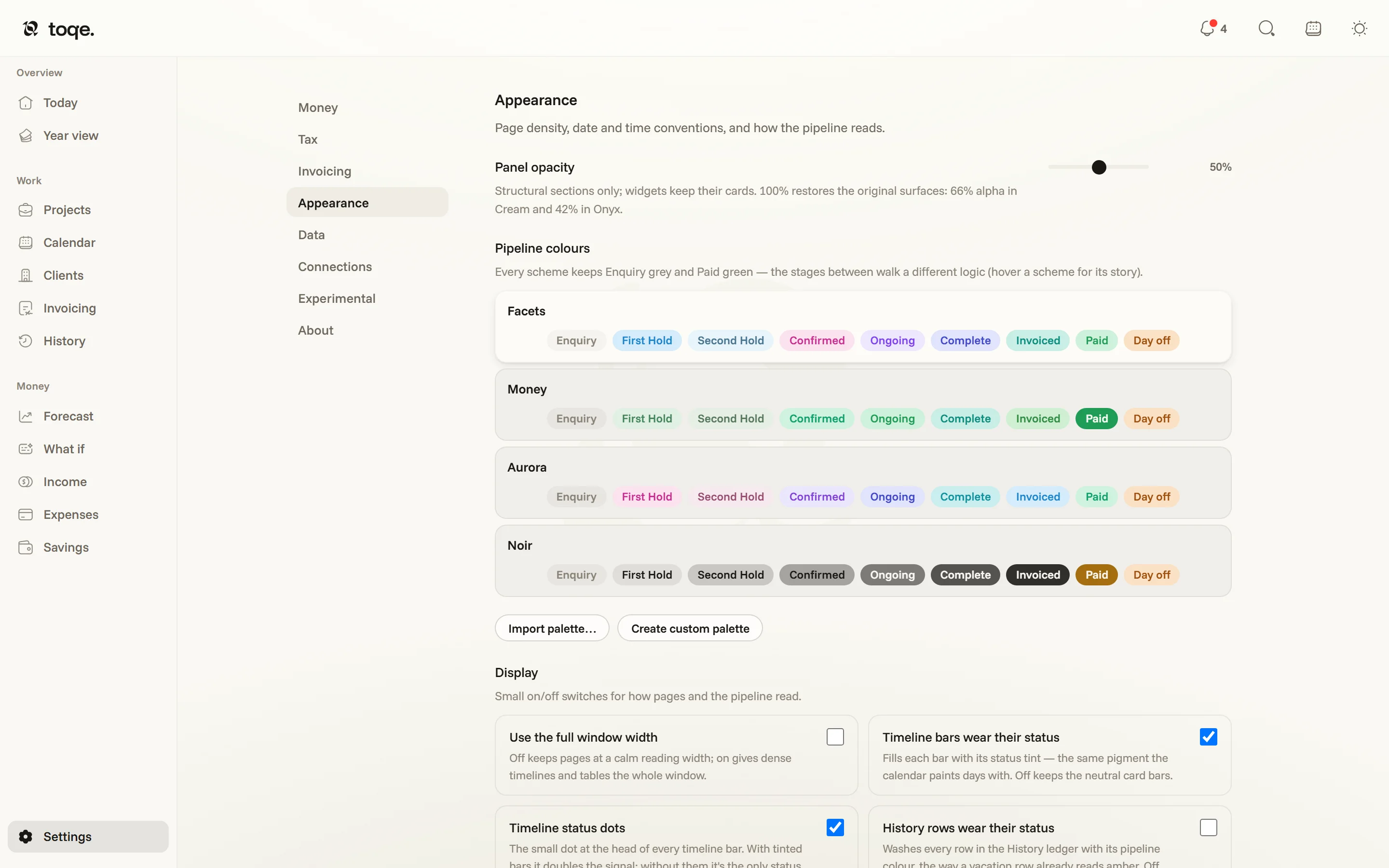
- Appearance — themes, colours, display switches and date formats; below.
- Data — where the document lives, backups, the import tool, and password protection once it’s on (Your data).
- Experimental — features still earning their place: money-first mode (below), password protection, connecting a Google account for read-only calendar events, and Enable MCP — a read-only server that lets Claude, or any MCP client, read your toqe and build CSVs you can import. Each row says whether it travels with your document or stays on this machine.
- About — the version, a check for updates (an update arrives with its release notes), a replay of the welcome tour, feedback, and the legal pages.
Appearance
Two themes — Cream and Onyx — with the topbar toggle one click between them. Pipeline colours decide how the eight pipeline slots (and the day-off amber) paint every surface — seven of them the ladder’s own rungs, the eighth the Invoiced colour, which since the money moved onto its own axis dresses the Invoicing pill rather than a stage. The four built-in schemes each walk a different logic — these strips are the schemes themselves, drawn from the same definitions the app applies:
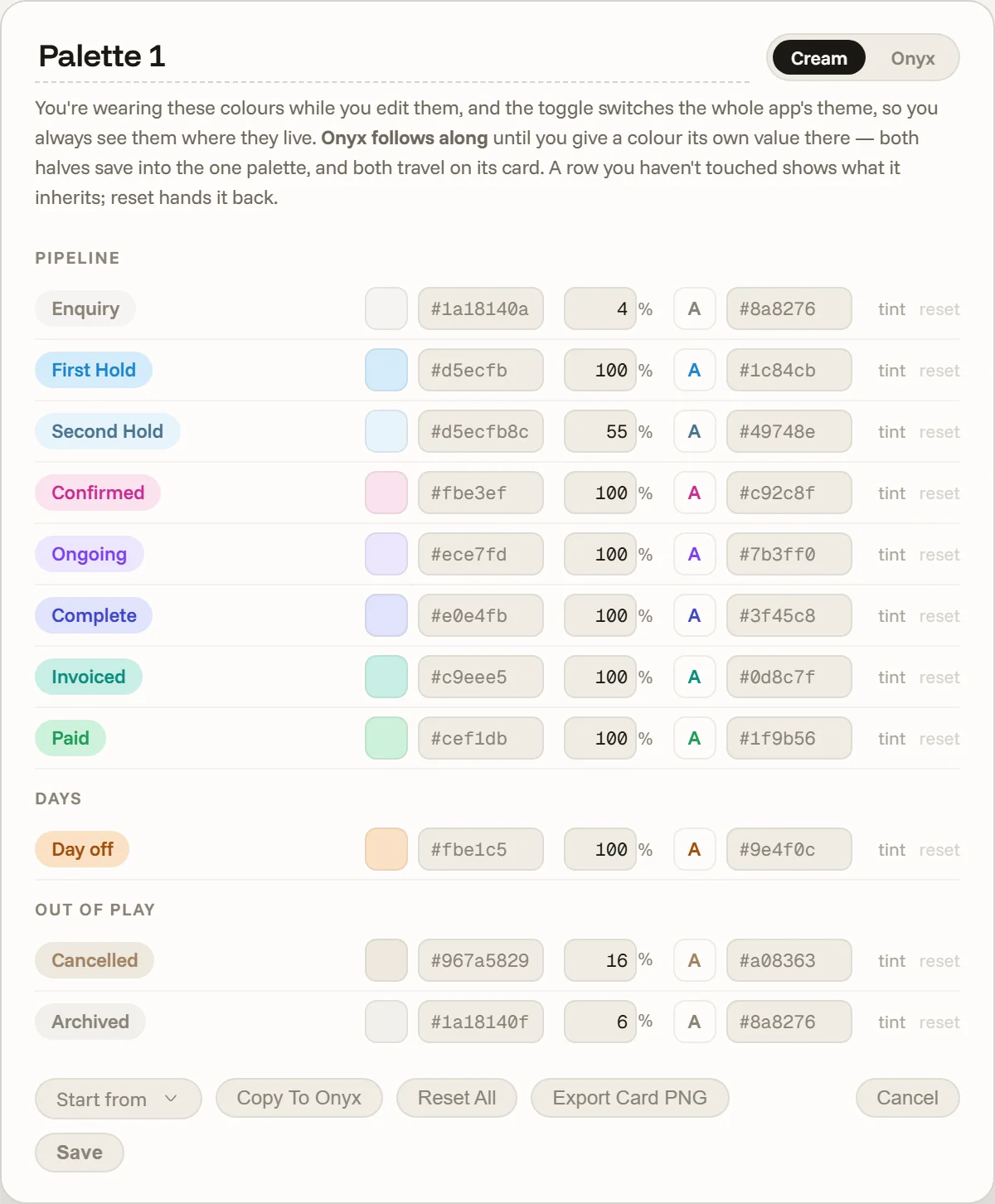
Create custom palette opens an editor that recolours the live app as you type, per theme. Palettes travel as PNG cards — a picture with a QR code that any toqe imports, and a link that opens the palette in the web app for someone without it. Display switches cover the rest: full window width, whether timeline bars and History rows wear their status, whether the note cards’ tabs run down the side or across the top, project emojis, and emoji in alerts. Date & time picks how dates read across the app — a preset or your own pattern — and how the Today clocks read.
Preferences — view picks, sorts, filters, saved views, your to-dos — live in the document, so they follow you between machines. Sync layout with your other computers covers the rest: theme, page density, the sidebar and every column width. Turn it off on a machine whose screen is a different size and it keeps its own layout; turn it back on and it follows the layout your other machines share, or becomes the one they follow if none has shared one yet.
Money first
Settings → Experimental holds two switches for running toqe as a finances-only app. They’re independent — either works on its own — and both travel with the document.
- Hide the Work pages takes Projects, Calendar, Clients, Invoicing and History out of the sidebar, and search, reminders and ⌘K stop pointing there too — a page the nav won’t show isn’t a page a click can land on. The calendar rail stays, because painting days off is still yours; what goes quiet is anything that creates work, so a sweep offers days off and half days rather than holds.
- Year view counts spending gives each month what it cost beside what it earned, and adds a Kept card to the Year view — earned minus spent, across the same fiscal window as the twelve months below it.
Keyboard
| Keys | What happens |
|---|---|
| ⌘K / Ctrl+K | Search everything — projects, clients, invoices, expenses — and land on the row. It reads status words as well as names: finished and done find work that’s wrapped, complete the jobs that are also paid, and invoiced or paid find by where the money is. |
| ⌘S / Ctrl+S | Save now, with the indicator confirming the write landed. |
| Esc | Closes the top-most thing — a popover before a card, a card before the page. |
| Shift-click (calendars) | Fill the working days between two ends. |
The theme toggle, the calendar rail and the bell all live in the top bar, on every page. The desktop app also answers links: a toqe://project/… opens straight onto that booking’s card and a toqe://studio/… onto the client’s record, bringing an already-running window forward rather than launching a second copy.